
I’ve previously talked about the SlimRIO project, but I finally got around to actually getting it properly setup and installed in the playroom downstairs. I figure I should give back to the community and write up a short How-To article.
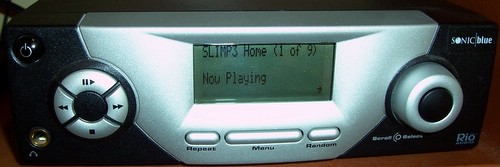
I run a Linux based music server, but SlimRIO will also work if you wanted to use Windows to serve up music. I will focus on Linux issues here, more specifically Ubuntu (Debian) configuration. There will also be some amount of hand waving that occurs, I’m going to assume you can figure out some of the details yourself. The SlimRIO website does cover Linux installation and configuration. I’m actually using SlimServer still as I haven’t upgraded to SqueezeCenter yet.
The first hurdle you might stumble on is getting the DHCP server to offer up an IP address. This will vary depending on your setup, but in my case my DHCP server is handled by my Linksys WRTGL router running DD-WRT. If you’ve got a compatible router, I strongly recommend considering using DD-WRT. Under the Adminstration->Services tab you can define a list of static leases that map MAC addresses to names and IPs. It’s really nice to talk to all of the devices on the home network by name – instead of trying to remember the IP address. [ok, so this probably wasn’t terribly helpful but there are lots of how-to documents on Linux DHCP servers]
Initially just run the Python based SSDP server. I found that on Linux the auto-detection of the host machines IP address didn’t work, so to be safe I recommend passing the numeric IP address (ie: 192.168.1.12) of your NFS file server. Later I’ll talk about using the C version and growing an /etc/init.d script for Debian based systems.
The next tricky part will be getting an NFS server configured. This is where the name (or IP) address you’ve assigned to the RIO will matter. I ended up using WireShark to sniff traffic to determine what was going wrong, it may be something you want to consider available to help diagnose problems. When the device boots it first gets an IP, the DHCP server tells the RIO what its hostname will be. The SSDP “response” tells it where the NFS server lives. The boot firmware then tries to mount via NFS the /tftpboot/<rio hostname> directory to get the rest of the firmware. Jeff Mock hosts the original investigation into the RIO boot sequence.
Assuming all things are configured correctly, it will just work. Of course you’ll have problems, but that’s where WireShark will be a life saver in pointing out what you did wrong. Another good place to look is the system logs on your Linux machine.
Now let’s make it slick and build an init.d script to start the SSDP server. This was the first time I had created one of these, so my solution may be naive – and I know that I took the long road to the solution I ended up with. The Debian policy manual covers init.d scripts in section 9.3, I initially found 9.3.5 that talked about the provided skeleton implementation. I then hacked this up to build my own init.d script for SSDP. The man page for the start-stop-daemon was very helpful in doing this.
Most of the implementation should be obvious as it is primarily directly from the skeleton. The only real work is in the start function:
#
# Function that starts the daemon/service.
#
d_start() {
start-stop-daemon –start –quiet –pidfile $PIDFILE \
–exec $DAEMON –background –make-pidfile \
— 192.168.1.12 \
|| echo -n ” already running”
}
I’ve added the –background flag as the C version of SSDP is not a daemon and would never return control to the calling program. The –make-pidfile instructs the start-stop-daemon to manage the pidfile for us instead of assuming the ssdp program will do so. The final — followed by the IP address of the NFS server is an argument to be passed to the ssdp executable. This script was installed as /etc/init.d/ssdp and now works as expected providing start, stop and restart.
The ssdp program was compiled from the C source available from the SlimRIO site. I installed it in /usr/local/bin and used chown to assign it to the slimserver user and group, then chmod +s to run the program setuid as a nod towards security (this causes it to run as the slimserver user).
Have the SSDP server automatically started at boot time is trivial. I originally found an article on how to do it in Ubuntu, but it was also in the Debian policy manual had I read it more carefully. (sometimes search engines make you stupid)
The SlimRIO firmware emulates a SliMP3 device which isn’t capable of some of the fancy (now standard) screen savers and visualizers, this isn’t a big deal for me. Also, in my setup it seemed that my MP3s were stored in a higher bitrate than it could easily handle without pauses. This is easily solved through a simple configuration in Slimserver under Player Settings->Audio – you can configure the bitrate limiting (default is no limit) which causes the music to be re-encoded on the fly, I found 128kbps to work fine.
As always, I get a kick out of “hacking” consumer electronics. Its is also nice to take something that was gathering dust and put it to good use.
Robin the author of SlimRIO pointed out that there is now a version slimrio-0.7b that configures madplay to halve the sampling rate. This trades off some high frequency response but avoids MP3 artifacts.
I just got a 2nd Rio. I can’t get it to work with SqueezeCenter but my other one works super. I looked on here and did install the ssdp set it to start up at boot and started it but it don’t do any thing that I can tell.
Is there any place that says hot to set up 2 Rio players?
-Raymond Day
I got it working with my 2 RIO’s! I am very happy it works now. Been playing songs with it and my Slimp3 and other RIO still works too.
It was hard to get it working but I did. It be hard to say how I did it. I am happy it works.
I got the 2nd one off ebay for about $10 and $10 shipping! Way better then $300 for the Slimp3 play. But the display on them is a lot better. Can play over 128kbps on them too.
-Raymond Day
Raymond didn’t mention what problems he encountered – but getting this to work with a 2nd RIO should be pretty easy, it just requires a bit of persistence.
You need to give each of the players a unique IP address. The Rio’s boot protocol will look in the NFS mount in the directory /tftpboot/RIOADDRESS/ where RIOADDRESS is the IP (or name if your DHCP server maps to names as mine does) of the Rio that is booting.
I’ll admit that the Rio boot sequence is tricky to figure out. Refer to http://empeg.org.uk/slimrio/linux.html for reasonably good instructions, and if you’re still stuck – read Jeff Mock’s site linked in the original article above, and crack out wireshark and sniff some packets.
Beyond that – Slimserver (SqueezeCenter) is design to handle multiple players, so that is trivial. As for the 128Kbps limit – if you read the SlimRIO pages carefully you’ll note that slimrio-0.7b-root.tar uses a kludge to the madplay library to handle higher bit rate MP3s.
C’mon guys, getting the second one working isn’t a big deal. Just follow the instructions for #1 and adjust the ip address. I’ve had three Rios gathering dust until I found the slimRio write-up, and now all three are working just fine.
Steps, in short, are —
1. Have a DHCP server on your LAN. I have the usual WRT54G/GS running tomato firmware (excellent).
2. Plug in a Rio, boot it.
3. Go to your router’s “devices” page and assign it a static IP. Note that IP.
4. Powercycle the Rio. That is, pull the plug, then plug it back in. Confirm it took the static ip.
5. Repeat 2, 3, 4 for each Rio.
6. Create /tftpboot/ for the Rio #1.
7. cp -r /tftpboot/ /tftpboot/ for each additional Rio.
8. create /etc/exports entries for /tftpboot/… for all Rios. I did one each. Just making one entry for /tftpboot/ should work as well.
9. Run your favorite flavor of ssdp and boot the Rios… everything works!
In my case, I got everything working on my fileserver, but then moved it to my mythtv backend, as that’s running the slimserver as well.
Enjoy!
I’ve been over this stuff several times and I’m sorry but I just don’t get it. Here’s where I am…
I’ve performed jmilk’s steps 1 through 5. My Rios are getting an address. However…
1. Where do I create the /tftboot directory?
2. I’ve installed NFS. What else do I need to do re:NFS?
3. Since my Rios have different IP addresses, how does “Just making one entry for /tftpboot/ should work as well” make sense?
4. Since I have never used SSDP, how do I run my “favorite flavor”?
I’ve been searching for clues using Google but everything I’ve read so far implies the reader has a clue. I’m clueless when it comes to this stuff.
Hopefully one of you savants would be so kind to help me out.
Forgot to mention, I downloaded ssdp.py and somewhere I read I have to type python ssdp.py. In the instructions it says that program will execute and I’ll be returned back to the command prompt. How long is this supposed to take? I would think a few seconds but it never comes back. So I Ctrl-C out of it and I get this…
^CTraceback (most recent call last):
File “ssdp.py”, line 34, in
(request, clientaddr)=s.recvfrom(1024)
KeyboardInterrupt
Also, in Andrew’s ssdp for /etc/init.d, he has the entry;
— 192.168.1.12 \
Where does that address come from? Am I supposed to replace it with my computer’s address?
Bob-El, you’ve got a lot of questions here.
Here are a few answers – mostly from memory since its been a while since I’ve been hacking on this.
1. Where do I create the /tftpboot directory?
– mine is off the root of my server which is hosting NFS. You can play tricks with your NFS configuration so that any directory appears to be the root.
2. I’ve installed NFS. What else do I need to do re:NFS?
Configure it to serve up the /tftpboot directory – usually this is done by editing /etc/exports
3. Since my Rios have different IP addresses, how does “Just making one entry for /tftpboot/ should work as well” make sense? directory to get the rest of the firmware.”
Because the protocol will look in the sub-directory of the NFS server specified by the SSDP protocol.
“The boot firmware then tries to mount via NFS the /tftpboot/
4. Since I have never used SSDP, how do I run my “favorite flavor”?
Well, either the python script – or do as I did an install it as an init.d script using the C version.
As for your woes with python – I can’t recall what ssdp.py did.
For my ssdp for /etc/init.d – the 192.168.1.12 is the IP address of the NFS server.
Well it’s been over a year. I had to drop this project for lack of time and just got at it again. I am further ahead than I was when I last requested your help but, I’m afraid I still need your assistance in getting this thing going.
Here’s what I’ve done. I downloaded SqueezeCentre for Linux from http://www.mysqueezebox.com/download. Used the DEB installer in Ubuntu 11.04 to install it.
My router (WRT54G running DD-WRT) was already set up with static IP addresses as I’ve been running SlimRIO in Windows successfully for a long time. But I want to run it in UBUNTU.
I downloaded the ssdp.c script. I have never compiled a C program before so I had to download and install a compiler. I found this command on Google: sudo apt-fast install build-essential. I compiled it using the command “gcc ssdp.c -o ssdp” and got the following compiler message:
ssdp1.c: In function ‘main’:
ssdp1.c:50:46: warning: passing argument 6 of ‘recvfrom’ from incompatible pointer type
/usr/include/sys/socket.h:166:16: note: expected ‘socklen_t * __restrict__’ but argument is of type ‘size_t *’
I renamed the output file, edited ssdp.c and changed “size_t” to “socklen_t” since I really don’t have a clue what’s going on or what I’m doing. 🙁 I recompiled it without errors. I changed the Property Permissions from “root” to “bob” and put ssdp in /usr/local/bin. I ran “sudo chmod +s ssdp” from the terminal as root.
I createe a folder in / called tftpboot. In that folder, I created a subfolder for both my Rio Receiver named after each unit’s IP address, I downloaded Robin O’Leary’s slimrio-0.7b-root.tar.gz and unpack it into each of the /tftpboot/ipaddress/ folders as root, so, as he explains, tar can create device nodes.
I set up a standard NFS server by typing “sudo apt-get install nfs-kernel-server”. Then I ran “sudo gedit /etc/exports”. I scrolled to the end of the file and added “/tftpboot/192.168.1.116 *(ro,sync,subtree_check,insecure,no_root_squash)” and “/tftpboot/192.168.1.117 *(ro,sync,subtree_check,insecure,no_root_squash)” for both my receivers (although “/tftpboot *(ro,sync,subtree_check,insecure,no_root_squash)” would probably have worked just fine. Then I saved it.
I downloaded your “init.d script” for SSDP and opened it in the text editor. I changed the IP address 192.168.1.12 to that of my computer, i.e. 192.168.1.99. Then I saved it with the path and name “/etc/init.d/ssdp”.
When that didn’t work, I recompiled the unmodified but error producing ssdp.c file, changed the permissions, put it in /usr/local/bin and chmodded it as before. It doesn’t work either.
As far as I can tell, my test RIO is getting the IP address and is connecting to something but I’m not getting the Empeg screen so it doesn’t work. When I ran the python script ssdp.py, initially, it reported finding the RIO’s IP and MAC addresses when I turned the unit on.
Using the command “ps -A | grep ‘ssdp'” I was able to determine ssdp is running. Similarly, “squeezeboxserve” is running. When I replaced “ssdp” with “nfs” I saw that nfsiod, nfsd4, nfsd4_callbacks and 8 instances of nfsd were reported.
Hopefully, if you don’t mind, you can point me in the right direction.
One more thing. The references to ssdp1.c above were from the test version which I renamed so I could have two copies. The compiled result was either ssdp or renamed to ssdp before I tried to use it.
Bob-El, let’s see if I can help. It’s been ages since I did the original work (exactly why I blog this stuff, I forget what I did and often need to refer back).
One of the things about C programs is warnings are non-fatal. I can’t remember if the warning came out for me or not, but warnings can be safely ignored. Doesn’t matter, the change you made should be harmless enough. It should have compiled something executable even with the warning.
The thing about init.d scripts is they need to get run. If you just installed the file but didn’t reboot the system, then nothing would have caused it to run.
Did you review the debian policy manual on this? http://www.debian.org/doc/debian-policy/ch-opersys.html#s9.3.3.1 or the more Ubuntu oriented version http://embraceubuntu.com/2005/09/07/adding-a-startup-script-to-be-run-at-bootup/
Of course you can just issue an /etc/init.d/ssdp start to get things going, but it’s nice to have it happen for free on boot.
Also if you’ve given the RIO a name mapping, that may be causing you grief. With my install I have the RIO assigned a fixed address, but it is given a name as well by my DHCP server – that name is ‘slimrio’.
Thus my /etc/exports file looks like:
/tftpboot/slimrio *(ro,sync,subtree_check,insecure,no_root_squash)
If you haven’t, grab wireshark and give it a spin. I find it really helpful in nailing down problems like this as it shows me the conversation the various bits are having (and there are a few moving parts here).
Hi and thanks for the reply. Yes, I understand about init.d scripts. I’ve actually rebooted several times. And, as you script provided start-stop-restart capability I tried stopping, starting and just plain restarting. Nothing.
My exports file has two entries, one for each RIO:
/tftpboot/192.168.1.116 *(ro,sync,subtree_check,insecure,no_root_squash)
/tftpboot/192.168.1.117 *(ro,sync,subtree_check,insecure,no_root_squash)
They are named SlimRIO-01 and SlimRIO-02 and are mapped thus in my router. I will try using the names instead. And let you know what I find.
I installed Wireshark last night but I haven’t tried it yet. Nor have I read the Debian Policy Manual. (Aren’t we supposed to consult the manual ONLY as a last resort? 🙂 I will check out the Ubuntu oriented version. However, hopefully, the name change will make the difference. I’m not sure what to restart when changing the script so I’ll just reboot. I don’t mind rebooting a Linux box and especially Ubuntu. The reboot time, compared to Windows, is a joke.
One question: What files/folder should not be owned by root? Or does it matter?
Interesting. After replacing the IP address with the name, restarting ssdp and rebooting my RIO I actually got the empeg screen (first time). I thought I had it licked but SqueezeCenter couldn’t “see” my RIO. I rebooted the computer and now I’m back to square one – no empeg screen. So, I guess I’ll fire up Wireshark and see what’s up.
I’m not getting any joy from Wireshark. I can ping the RIO so it must have received the IP address but that’s all. It appears occasionally on the screen in Wireshark. I don’t know what that means because it scrolls past too fast for me to read the line. I need to read the docs.
A couple of IP questions. My computer (music host) IP is 192.168.1.99. In your init.d_ssdp file there is an IP which is 192.168.1.12. I replaced the 12 with 99. Is that right? Then, in Robin’s ssdp.c, there is a serve IP which is 194.168.151.150. I replaced that with 192.168.1.99.
Did I do that right, at least?
Wireshark should have some reasonable filtering and capture modes allowing you to do some deeper diagnosis. The best way to help you is probably recap what the correct boot sequence looks like, and what parts are in play. [the following is from memory, but I think it’s right]
1) When the RIO boots, it goes and gets an IP address.
2) Then it makes the SSDP request to figure out what’s up.
3) The SSDP response tells the RIO where the NFS server is.
4) Then RIO then grabs the kernel and the empeg display goes up.
5) Now the 2nd phase of the boot happens and the remainder of the firmware comes over NFS and you get the SLIM Rio banner.
So for Bob-El, yes – your server address is 192.168.1.99 and should be used in place of the 192.168.1.12 value.
Based on what you’ve said – it sounds like SSDP is running, and it’s likely handing out valid information.
Have you checked what the NFS server is doing?
No. How can I tell what the NFS server is doing?
Check out /var/log/syslog and see if you’re getting anything there.
In my case I see
Dec 12 21:56:47 server nss_wins[5887]: authenticated mount request from slimrio.lowtek.ca:800 for /tftpboot/slimrio (/tftpboot/slimrio)
Dec 12 21:56:53 server nss_wins[5887]: authenticated mount request from slimrio.lowtek.ca:800 for /tftpboot/slimrio (/tftpboot/slimrio)
But check out https://help.ubuntu.com/community/NFSv4Howto#Troubleshooting which goes into detail on turning up the log output.
FWIW – WireShark while helpful, needs to get into the network in the right spot to capture the packets. I just tried a very naive setup and only saw the SSDP request go by (the other packets didn’t get sent to my PC due to smart routing hardware)
First of all, the only “nss” references in /var/log/syslog was;
Dec 13 17:17:24 Bobz-DT nss_wins[1863]: step time server 91.189.94.4 offset -1.547589 sec
re: NFSv4Howto
I’d been looking at this page and was somewhat unsure what I should or should not be concerned about. Do I need to do this;
“In /etc/default/nfs-kernel-server we set:
NEED_SVCGSSD=no # no is default
because we are not activating NFSv4 security this time.”
But if “no” is the default, why bother?
And;
“For the server, you can e.g. raise rpc.svcgssd log level in /etc/default/nfs-kernel-server:”
RPCSVCGSSDOPTS=”-vvv”
I appended that to the end of the file
I restarted nfs and nfs-kernel-server (which appear to do the same thing) and ran ps xuwa | grep rpc.gssd resulting in this output:
bob 3221 0.0 0.0 13124 1032 pts/0 S+ 18:26 0:00 grep –color=auto rpc.gssd
which is nothing like the example in the troubleshooting page.
So I’m still missing something but I don’t know what. I haven’t browsed the other nfs-* scripts to see what else I can set. I can try that later but I don’t know if I’ll understand what I’m doing enough for that to be helpful.
It seems clear to me that nfs isn’t working correctly but why?
The problem is that by default nfs is pretty quiet.
The nss_wins output appears to be some aspect of the samba support I have baked into my server (it hosts samba and nfs among other things).
There is a utility nfswatch that might help – I can’t seem to install it on my server (I’m on a fairly old version of Ubuntu). http://manpages.ubuntu.com/manpages/precise/en/man8/nfswatch.8.html
This is why I used wireshark to track down the issue originally. Learning how that works, and getting it situated on the network where it’ll see the packets is really the best way to solve this.
NFS is probably working fine, what’s probably not working is the path that you’re pointing things at. So either the RIO is looking for the wrong machine (IP) to host the NFS server, or the path that it’s trying to mount is wrong.
After I wrote to you last, I rebooted my computer and when I rebooted my test RIO, it connected and eventually went to the screen saver. Success! I set up my music folders in the Music Server Settings. However, after the scan was over, the player showed 0 songs in 0 folders. I let it go and this morning had at it again. First of all I configured the server settings and now I’m listening to some Christmas music with my headphones. The RIO is next to me on my desk.
I still have a problem, though, but I think I’ll be able to resolve it. Only one player is showing on the Music Server. The other, which is hooked in to my Home Theater system booted okay and also went into screen saver mode but, for some reason, isn’t being recognized.
I’m going to try a few things and will report back. I think it’s important that I log as much of my failures and successes in case someone else finds your blog and can garner some insight from my trek through this. 🙂
After I get everything running I’ll try to recap my steps and post them here. In spite of the fact your instructions are much better than what Robin shared, they are not detailed enough for someone with out the experience. My experience writing technical documentation is that you can’t assume the reader understands what you’re saying. For example, Robin says “Install and run an SSDP server.” That sentence may have meant something to you but I didn’t know what an SSDP server was nor how to install and run it. As is usually the case, Googling helped.
One thing I’m still not sure of is when I created /tftpboot/RIOADDRESS for each RIO and put them in /etc/exports I didn’t put /tftpboot itself in there. Consequently, I dumped Robin’s file in the first RIOADDRESS directory and then again in the second. Perhaps if I’d just put it in /tftboot it would have worked also. I think I’ll give that a try.
I’ve been wanting to get my music playing from my Ubuntu computer for a long time. While SlimRIO works in Windows and is a whole lot easier to set up, I had a couple of reoccurring problems, the worst of which was occasional pauses in the music playback. This, you can appreciate, can be quite annoying. And it happened with XP and Win 7, which I installed last fall after my hard drive crashed. I suspect the reason for this is Windows’ seemingly constant hammering of the hard drive. That was one difference I noticed from the first time I started using Linux with Ubuntu 8.04 a few years ago. When idle, the OS is hardly ever accessing the HD. At the moment, I’m writing on my Ubuntu box and as I glance at my Win 7 box the HD light is flickering constantly. I would expect that Linux users might experience longer-lasting HDs.
My jubilation was premature. It refuses to work again. Back to the drawing board.
I finally found my problem. Last night I was watching “Criminal Minds” on TV with my wife and, as often happens, I was mulling over this problem in my head instead of paying attention to the show. Suddenly it came to me. Since we share the same native soil, you may have heard me give myself a right good whack on my forehead. 🙂
What was preventing my Rios from accessing the Ubuntu system was the fact that I still had the Rio software running on my Windows computer. Killing armgr.exe solved the problem immediately. So now I’m happily listening to some more Christmas music.
Once again, many thanks for you patience and many helpful suggestions. I did install “nfswatch” and it proved what I though; nothing much was happening.
Knowing full well that I’ll have to reinstall everything at some later date and knowing how my memory works, I’ve written up a somewhat more detailed procedure in LibreOffice that I’d be happy to send you. If you want a copy just send me an email.
All the best,
Bob
Bob, I’m pleased you’ve succeeded in making this work. Hopefully your journey will assist other RIO owners to extend the usefulness of their devices.
I’ve just managed to get this going after literally year of plugging away at the problem on and off. Phew, thanks for the tips all.
Have not done this for a long time and wanted to try and set it up again. The only way before was for me to turn off DHCP server in my router and set one up on my Ubuntu server. But I don’t want to do that now. On my router I put to have my RIO as a static IP with it’s MAC address.
I can run the ssdp.py and when I turn on my Rio it shows it’s IP and MAC address I gave it in the router.
I can do this:
root@ICS32:~# service nfs-kernel-server restart
* Stopping NFS kernel daemon [ OK ]
* Unexporting directories for NFS kernel daemon… [ OK ]
* Exporting directories for NFS kernel daemon… [ OK ]
* Starting NFS kernel daemon [ OK ]
root@ICS32:~#
So seems like all is good but my RIO just stays there looking for server.
For both my RIO’s I got the /etc/exports looking like this:
/media/6TB/USBdisk2-3TB/home/part2/mystuff/slimrio/tftpboot/192.168.2.235 *(ro,sync,subtree_check,insecure,no_root_squash)
/media/6TB/USBdisk2-3TB/home/part2/mystuff/slimrio/tftpboot/192.168.2.169 *(ro,sync,subtree_check,insecure,no_root_squash)
That’s were I have my old RIO setup. I don’t get why it’s not working. It’s like it’s not seeing the file system on my server.
Is there a way to test it to list what file systems it can mount in the RIO?
-Raymond Day
Raymond Day. Just read your post. In 2012, after working through this with Roo’s help, I wrote a “How To” document which I’ve updated a couple of time since as I upgraded my Ubuntu installation as I changed hardware. I’m currently looking at trying to get it to run on a Raspberry Pi with the Rasbian OS.
I’ve sent a copy of my procedure to Roo and he will make it available to anyone who’d like to have it.
Bob was kind enough to send me the “how to” document and I’ve hosted here http://lowtek.ca/roo/wp-content/uploads/2015/11/How-to-Install-SlimRIO-on-Ubuntu.odt (link will appear as a download)
To be honest, he’d sent it along previously (ages ago) and I had failed to share. At least it’s here now.
I found that the following were required in my setup for things to work. I am using Robin’s slimrio-0.7b-root.tar.gz with his ssdp.py script and it is working for the original Rio, Sonic Blue and Dell models.
NFS v2 with UDP must be enabled.
Wireshark also revealed a NFS2ERR_OPNOTSUPP error when booting the receiver. To resolve the error, my exportfs had to be “/tftpboot/x.x.x.x *(ro,sync,no_subtree_check,insecure,no_root_squash)”.
The final change needed was adding the last line to /tftpboot/RIOADDRESS/sbin/init to say “while true; do /bin/slimrio -s SLIMADDRESS; done” where the RIOADDRESS is the IP of the receiver and SLIMADDRESS is the IP of the LMS / SlimServer.
This is one of the few resources that doesn’t require going to archive.org so I thought I’d share.
Can the files slimrio-0.7-root.tar.gz, slimrio-0.7b-root.tar.gz, ssdp.py, ssdp.c files be posted here for others to easily find and use?